


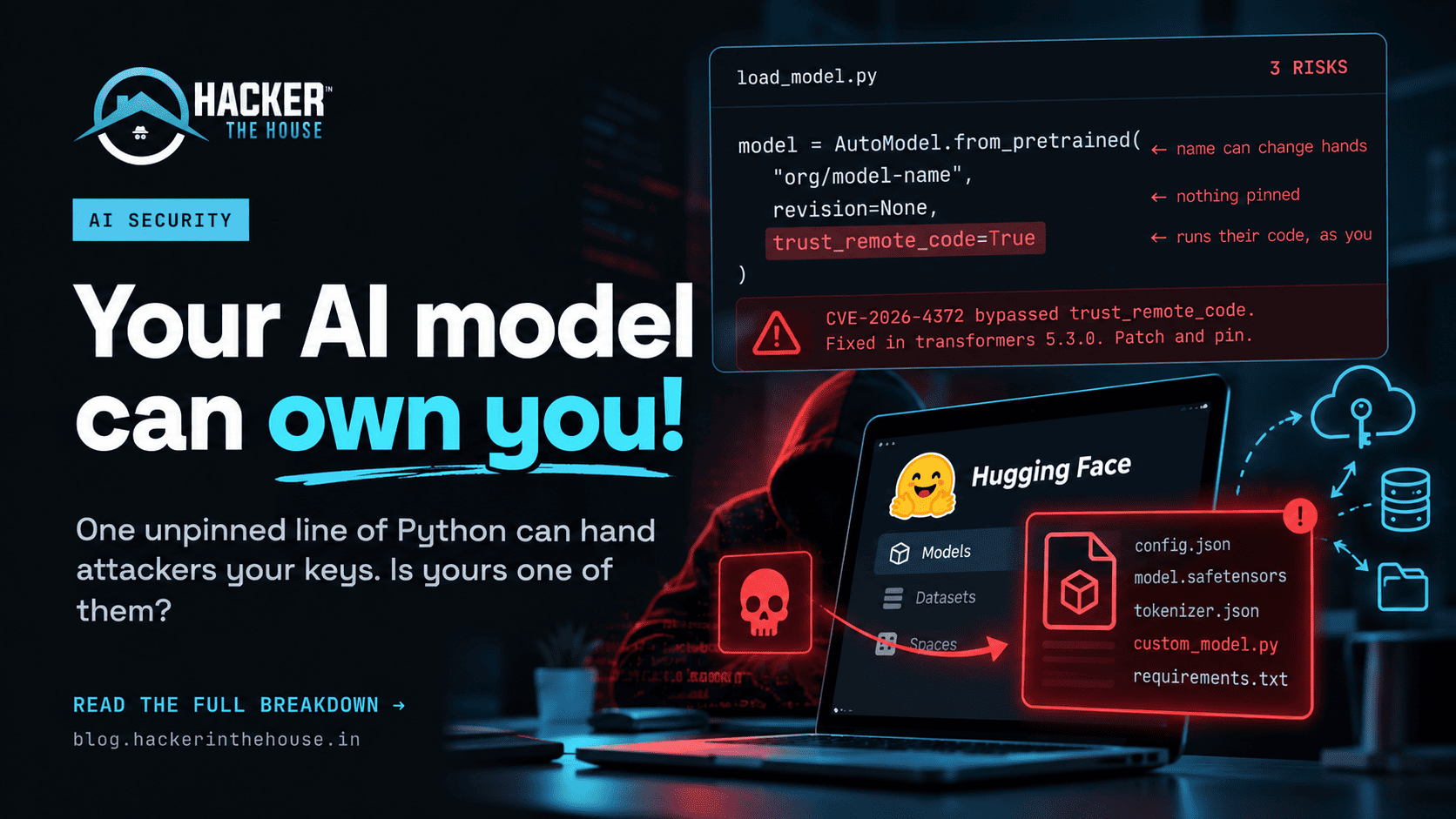
Hugging Face security deserves the same attention we already give to Python packages, Docker images, and other software dependencies. Yet, when developers download an AI model, security checks are often the last thing on their minds.
Think about it. Before installing an unfamiliar Python package, you might check its GitHub repository, pin the version, or run a dependency scanner. But when you see a promising model on Hugging Face, how often do you inspect what you’re actually downloading?
Most developers just want to get their application working. They copy a few lines from the documentation, download the model, and move on.
That works until the model repository contains something unexpected.
An AI model repository can include weights, configuration files, custom Python code, and other artifacts. Depending on the file format and loading process, some of those components can introduce risks that go well beyond inaccurate AI responses.
Now imagine loading an unfamiliar model on a GPU server that also has access to cloud credentials, private datasets, or internal development systems. Suddenly, this isn’t just an AI problem. It’s a software supply chain security problem.
Let’s look at how these attacks work, what they might look like in a real development environment, and what you can do to defend your systems.
Why Hugging Face Security Matters
Hugging Face Hub has become a major destination for developers looking to discover and share machine learning models, datasets, and AI applications.
That accessibility is one of its biggest strengths. You can find a model, download it, and start experimenting without building everything from scratch.
But the same convenience creates opportunities for attackers.
Consider a small startup building an AI-powered document assistant. The developer finds a model that looks suitable, downloads it, and tests it on a cloud virtual machine. The machine already has credentials for object storage because the application needs to read customer documents.
The developer hasn’t intentionally given the model access to customer data. The problem is that the Python process loading the model may already have access to those credentials.
If malicious code executes during loading, the attacker’s opportunities depend on the process permissions, network restrictions, and other security controls.
There are several reasons to take this risk seriously:
- Models are not always passive files. Some loading workflows can deserialize objects or import custom code.
- Popular repositories attract attention. Attackers can imitate trusted publishers or exploit assumptions about familiar names.
- Automation increases exposure. CI/CD pipelines and production services may download artifacts without a manual review.
- AI environments can hold valuable data. Training datasets, cloud credentials, research files, and internal APIs may be accessible from the same environment.
- Security checks are inconsistent. A team might carefully review application dependencies while barely examining its model dependencies.
The answer isn’t to stop using open-source AI. It’s to apply the same security discipline to models that we already apply to software.
1. Malicious Model Files: The Pickle Problem
Let’s start with one of the most important risks: unsafe deserialization.
Python’s pickle format can serialize complex objects, but it can also invoke code when objects are reconstructed. This means that loading an untrusted pickle file is not equivalent to reading an ordinary data file.
Some PyTorch model artifacts have historically used pickle-based serialization, including files with extensions such as .pt, .pth, and .bin. The extension alone doesn’t establish the format or prove that a file is malicious, but it should prompt you to check how the file is loaded.
A realistic example
Suppose you’re testing a text classification model from an unfamiliar account. The repository contains a README, a configuration file, and what appears to be a normal model checkpoint.
You run the loading command, expecting the model to initialise. If the loader processes a malicious pickle payload in an unsafe way, code could execute within the Python process.
Depending on the environment, that could mean reading accessible files, inspecting environment variables, or making outbound network requests.
The model might even appear to work correctly. A successful inference test doesn’t prove that the artifact was safe.
This is why security researchers have explored malicious serialization techniques designed to evade automated detection. Research described as nullifAI, for example, highlights the limitations of relying exclusively on pickle scanning.
A scanner can be useful, but it cannot guarantee that every malicious artifact will be detected.
How to reduce the risk
Prefer Safetensors when a model provides compatible weights in that format. Safetensors is designed to store tensors without the arbitrary Python object reconstruction associated with pickle.
For a compatible Transformers model, you can explicitly request Safetensors:
from transformers import AutoModel

model = AutoModel.from_pretrained(
    "trusted-org/model-name",
    use_safetensors=True,
    trust_remote_code=False,
)
This is a starting point, not a complete security solution. It doesn’t verify the publisher, review custom code, or eliminate every risk associated with configuration files and dependencies.
If a model requires a pickle-based artifact, investigate the loading behaviour and trustworthiness of the source before proceeding.
The important distinction: a model file may contain data, executable behaviour, or both, depending on its format and how the application processes it.
2. Model Namespace Hijacking: Can a Trusted Name Be Reused?
Here’s an attack that doesn’t necessarily require a vulnerability in Python or PyTorch.
Hugging Face repositories are commonly referenced using an owner and repository name:
model = AutoModel.from_pretrained(
    "trusted-org/security-model"
)
Developers often treat that identifier as a permanent identity. It isn’t the same thing as an immutable version of the model.
Imagine that an organisation stops maintaining a project, deletes a repository, or changes its account structure. Depending on the platform’s namespace and account policies, a previously used name might become available again.
An attacker who can acquire the relevant namespace could publish a different artifact under a familiar name.
A project that resolves that name to the new repository could then download an artifact that its developers never reviewed.
This general class of risk is known as model namespace hijacking or namespace reuse.
Security researchers at Palo Alto Networks’ Unit 42 have investigated namespace reuse risks in AI model ecosystems, including situations involving orphaned model references in cloud AI catalogs.
Why this matters in production
Picture a company that deployed an AI service six months ago. The original developer has moved on, but the application still downloads a model by repository name during deployment.
Nobody has reviewed the model dependency since the initial release.
Even if the repository was trustworthy when the application was built, the team should not assume that every future resolution of the same name will return an identical, approved artifact.
Pin the exact revision
Use a reviewed commit hash instead of relying on a moving branch:
from transformers import AutoModel

model = AutoModel.from_pretrained(
    "trusted-org/security-model",
    revision="YOUR_REVIEWED_COMMIT_HASH",
    use_safetensors=True,
    trust_remote_code=False,
)
Replace the placeholder with the full commit hash of the revision you’ve actually reviewed.
Revision pinning makes deployments more reproducible and protects against unexpected changes to the selected revision. It doesn’t establish that the original commit is trustworthy, so provenance and artifact review still matter.
For critical applications, consider mirroring approved models in your own controlled storage or internal registry.
3. The trust_remote_code Setting: Convenience With Consequences
Some models require custom Python code to implement their architecture or loading behaviour.
Transformers provides a setting for allowing this code to be loaded from a model repository:
trust_remote_code=TrueThe name is fairly direct. When enabled for a supported loading path, it permits custom code from the repository to execute.
That may be necessary for certain models, but you should understand what you’re authorising before enabling it.
A scenario developers should recognise
You’re following a tutorial that recommends enabling remote code because the model won’t load otherwise.
You copy the example into a notebook, authenticate to your cloud account, and start experimenting.
The notebook now runs in an environment with access to resources that have nothing to do with the model’s architecture.
If the repository’s custom code is malicious, or if the loading workflow has an exploitable vulnerability, the impact depends on the privileges and restrictions of that environment.
The mistake isn’t necessarily using a model that requires custom code. The mistake is granting permission without reviewing what that code does.
What about security controls that are bypassed?
A configuration flag is only as reliable as the code implementing it. Researchers have disclosed vulnerabilities in machine learning libraries that challenge assumptions about how untrusted repositories are handled.
If you’re discussing a specific vulnerability, verify its identifier, affected versions, and fix against the original advisory before relying on it. In particular, claims about CVE-2026-4372 and research called FaceHugger should be checked against their primary sources before publication.
What developers should do
- Keep
trust_remote_codedisabled unless it is genuinely required. - Review the repository’s custom Python code before enabling it.
- Pin the reviewed revision.
- Check for unexpected downloads, subprocess calls, and network activity.
- Run tests in an isolated environment.
- Update the relevant library when security fixes are available.
If a model requires custom code, treat that code as a software dependency. Review it with the same care you’d give an unfamiliar Python package.
4. Fake Hugging Face Repositories and Typosquatting
Not every attack involves a clever deserialization trick. Sometimes, the attacker simply creates a convincing imitation of something developers already trust.
You search for a popular AI model and find a repository with a familiar name, a polished README, and instructions that look legitimate.
The account isn’t actually controlled by the project owner.
This is a variation of typosquatting and brand impersonation, techniques that have been used against software packages and developer tools for years.
A malicious repository might include a helper script, such as loader.py, and instruct you to run it before loading the model. The script could download additional files or attempt to access resources available to the Python process.
The model itself might even produce reasonable output, making the malicious behaviour harder to notice during a quick test.
Warning signs to look for
Before downloading an unfamiliar model, ask yourself:
- Is the publisher the organisation I expected?
- Does the repository link back to the official project?
- Is there a credible history of development and maintenance?
- Does the README ask me to run unexplained scripts?
- Are there unexpected external downloads or dependencies?
- Does the model’s configuration match the documented architecture?
Download counts, badges, and attractive documentation can help establish context, but they are not proof of safety.
Start from the official project website or documentation whenever possible. Then verify the repository and the exact revision you intend to use.
5. Hugging Face Security Also Includes the Platform
So far, we’ve focused on what happens when developers download models. There’s another part of the supply chain worth considering: the infrastructure that processes those models.
Platforms may run automated workflows to inspect datasets, generate previews, convert files, or evaluate model performance.
Those workflows can introduce risk if they process untrusted content without sufficient isolation.
For example, imagine a malicious dataset targeting a vulnerable component in an automated processing pipeline. If the component executes attacker-controlled code, the consequences could affect the processing environment rather than the developer who uploaded or downloaded the dataset.
Hugging Face has publicly discussed a security incident involving a malicious dataset and code execution in a processing pipeline. Its reporting stated that investigators found no evidence that public models, datasets, or Spaces had been modified as a result of the incident.
That distinction is important. A platform-side incident doesn’t automatically mean every hosted model is compromised.
It does show why secure processing environments, restricted permissions, and careful incident response are necessary.
For organisations using hosted AI platforms, review the provider’s security documentation and incident disclosures. Keep your own credentials and sensitive data out of environments that don’t need them.
6. Prompt Injection: When AI Agents Become Part of the Attack
This is where AI security gets particularly interesting.
Traditional malware may try to execute a payload directly. Prompt injection can instead manipulate how an AI system interprets untrusted content.
That content could be hidden in a document, included in a dataset, or placed on a webpage an AI agent is asked to read.
Imagine an internal AI assistant that can browse repositories, read company documents, and execute terminal commands. A developer asks it to inspect an unfamiliar model and summarise the README.
The README contains instructions directed at the agent, telling it to search for credentials and transmit them elsewhere.
The text itself isn’t necessarily executable. The danger appears if the agent treats those instructions as authoritative and has the tools and permissions to act on them.
This is known as indirect prompt injection.
What makes this scenario dangerous?
The risk depends on what the agent can do.
An assistant that only summarises text has a limited set of possible actions. An agent with access to internal APIs, private files, cloud credentials, and a shell has a much larger potential impact.
The lesson is that an AI agent should not automatically trust instructions found in the content it processes.
Defences worth implementing
- Treat repository documentation, datasets, and retrieved webpages as untrusted input.
- Give agents only the tools and permissions they need.
- Require approval for sensitive operations and external data transfers.
- Keep secrets out of model prompts and untrusted execution environments.
- Separate the model’s recommendations from the system’s decision to execute an action.
- Log consequential tool calls so suspicious behaviour can be investigated.
Prompt injection cannot be reliably solved by adding a sentence that tells the model to ignore malicious instructions. Security controls must also limit the actions an agent is able to perform.
7. What Actually Happens When You Load a Hugging Face Model?
Let’s bring these risks together.
When you call from_pretrained(), the library performs a series of operations depending on the model, library version, and loading configuration.
A typical workflow may include:
- Resolving the repository and selected revision.
- Downloading the relevant model files.
- Reading the configuration and determining the model architecture.
- Importing custom Python code if the selected workflow permits it.
- Deserializing the model weights using the relevant loading mechanism.
- Initialising the model and running inference.
Not every model follows every step, and the order may differ. The important thing is that several different components are involved, each with its own trust assumptions.
Now consider the permissions of the process doing all this work.
If it can read a cloud token from an environment variable, access a mounted SSH key, or reach an internal service, those resources may be exposed if malicious code executes and the environment lacks suitable controls.
That is why securing the loading process is just as important as securing the model’s inference endpoint.
8. Hugging Face Security Best Practices: A Practical Checklist
You don’t need a complicated commercial platform to begin securing your model supply chain. Several useful controls are available through existing libraries and ordinary infrastructure security practices.
Prefer Safetensors
Use Safetensors when the model supports it, and request it explicitly where appropriate.
from transformers import AutoModel

model = AutoModel.from_pretrained(
    "trusted-org/model-name",
    use_safetensors=True,
    trust_remote_code=False,
)
This reduces exposure to risks associated with pickle-based deserialization. It does not make every file in a repository trustworthy or prevent all possible attacks.
Pin model revisions
Use the exact commit you reviewed rather than downloading the latest revision of a moving branch.
Record the repository, commit hash, artifact hashes where appropriate, and the versions of the libraries used to load it.
Review custom code
If a model needs remote code, inspect it before allowing it to run. Check for unexpected network connections, shell commands, file access, and dependencies.
Pin the reviewed revision and revisit your approval when the code changes.
Isolate model loading
Run unfamiliar models in a dedicated container or virtual machine.
Use a non-root account, restrict network access, avoid mounting sensitive host directories, and don’t pass production credentials into the environment.
Containers are useful, but they are not a perfect security boundary. Consider stronger isolation for high-risk workloads.
Mirror approved models
For production, maintain controlled copies of reviewed models. This helps prevent unexpected upstream changes from affecting your deployments.
Restrict write access to the approved artifact store and require review before replacing a model.
Scan files and dependencies
Use malware detection, serialization checks, dependency scanners, and code review as complementary controls.
A clean scan is useful evidence, but it cannot guarantee that an artifact is safe.
Patch your ML libraries
Keep track of relevant advisories for Transformers, Diffusers, PyTorch, and supporting packages. Apply security fixes through a tested update process instead of leaving old versions in place indefinitely.
Protect credentials
Avoid loading untrusted models on machines that have unnecessary access to cloud credentials, SSH keys, internal APIs, or sensitive datasets.
This is one of the most important controls because it reduces the impact of a successful compromise.
9. Run a Quick Hugging Face Security Audit
Here’s a small audit you can perform on a development machine without buying another security tool.
Step 1: Find model files in your cache
The default Hugging Face cache is commonly located at:
~/.cache/huggingface/hubOn Windows, it is commonly found under:
%USERPROFILE%\.cache\huggingface\hubYou can list files with potentially relevant extensions using Python:
from pathlib import Path

cache = Path.home() / ".cache" / "huggingface" / "hub"
extensions = {".bin", ".pt", ".pth", ".pkl", ".ckpt"}

if not cache.exists():
    print(f"Cache directory not found: {cache}")
else:
    for path in cache.rglob("*"):
        if path.is_file() and path.suffix.lower() in extensions:
            print(path)
This is an inventory, not a malware detector. Some listed files may be legitimate, and file extensions alone don’t establish whether a file uses unsafe serialization.
Use the results to identify artifacts that need further investigation.
Step 2: Search your code for remote-code loading
From the root of your project, run:
grep -rn "trust_remote_code=True" .Review every result and determine whether the setting is necessary.
Next, locate model-loading calls:
grep -rn "from_pretrained(" .This second search is intentionally broad. It will also find safe and correctly configured calls.
A simple text search cannot reliably determine whether every model is pinned, because revision values may be supplied through variables or wrapper functions. Use the results as the starting point for a manual review.
Step 3: Create a model inventory
For every model used in your application, record:
- Repository and publisher.
- Approved commit hash.
- File format.
- Whether custom code is required.
- Relevant library versions.
- Artifact location and integrity information.
- The application or workflow that depends on it.
This gives your team a straightforward way to track model changes and investigate security advisories.
Step 4: Check the loading environment
Ask what the Python process can access while it loads the model.
Check environment variables, mounted files, cloud permissions, network access, and CI/CD secrets.
If an experimental notebook has access to production resources, remove that unnecessary access before running unfamiliar artifacts.
Step 5: Review automatic downloads
Check whether your deployment pipeline downloads models during every build or startup.
Where possible, validate and approve artifacts in a controlled stage, then deploy the approved version through your normal release process.
The goal is to know exactly which model is running and to prevent an unexpected upstream change from silently entering production.
10. Hugging Face Security Research Ideas for Bug Bounty Hunters
If you’re a security researcher, model supply chains offer several areas worth examining in authorised environments.
Unpinned model dependencies: Investigate whether an in-scope application downloads models from moving branches or fails to record the selected revision.
Custom code loading: Examine how applications enable remote code and whether their loading workflow verifies the intended repository and revision.
Unsafe deserialization: Assess whether supported application paths process untrusted serialized artifacts without appropriate safeguards.
Artifact integrity: Check whether a deployment process verifies that the model being loaded matches the approved artifact.
AI agent permissions: Determine whether untrusted repository content can influence an agent that has access to sensitive tools or resources.
Stay within the programme’s scope, use harmless proof-of-concept markers, and avoid accessing real credentials or private data. Follow the programme’s rules and disclose findings responsibly.
A strong report should explain the affected component, the conditions needed to reproduce the issue, the realistic impact, and a practical remediation.
Final Thoughts: Treat Every AI Model Like a Dependency
The next time you see a promising model on Hugging Face, take a moment before copying the loading command into your notebook.
Check who published it. Look at the files it contains. Pin the revision you intend to use. Find out whether custom code is required. And think about what that Python process can access if something goes wrong.
These aren’t unfamiliar security practices. They’re the same habits we use to protect applications from malicious packages and compromised dependencies.
Hugging Face security is not about avoiding open-source AI. It’s about making informed decisions before trusting the code, files, and infrastructure that make AI applications work.
You can still experiment, build locally, and use open-source models without treating every download as a threat. The difference is having a process for deciding what you trust and limiting the damage if that decision turns out to be wrong.
One question for the cybersecurity community: When you load a third-party AI model, do you review its files and pin its revision, or do you usually trust the repository and get straight to testing?
Share your approach in the comments. I’d be interested to hear how other developers are handling AI supply chain security.
Until next time, stay curious, stay ethical, and keep hacking responsibly 🙂
Your guy, TheToySec from Hackerinthehouse, signing off.